GA4 for Small Businesses: What to Track and How to Read Reports

Most small businesses don’t lack data; they lack clarity. GA4 collects a lot of information, but without proper guidance, it can feel overwhelming instead of helpful. Many business owners open Google Analytics, see dozens of reports, and still leave unsure of what to focus on.
The good news is that GA4 can be useful without being complicated. For GA4 for small businesses, advanced setups, deep analysis, or endless metrics aren’t necessary. What really matters is tracking a few small business analytics metrics that clearly show what’s working and what isn’t.
That’s exactly what this guide focuses on. You’ll learn what GA4 for small businesses should track and how to read GA4 reports in a practical, business-friendly way. So you can make decisions without wasting time.
Let’s get started!
GA4 for Small Businesses (TOC):
What Small Businesses Actually Need From GA4
Small businesses don’t work like large companies. Large enterprises have data teams, advanced tools, and the time to analyze complex reports. Most small businesses don’t. They need simple, clear insights that help them make everyday decisions quickly.
That’s the main difference: enterprise analytics focuses on deep data, while small business analytics focuses on clarity and usefulness.
Why Tracking Everything Creates Confusion
- GA4 offers many features, but small businesses don’t need all of them.
- Trying to track everything often makes reports messy and hard to understand.
- Instead of helping, too much data slows down decision-making.
Instead of tracking everything, small business owners achieve better results by focusing on fewer, meaningful metrics that provide clear answers.
The Key Questions GA4 Should Answer
For GA4 for small businesses, analytics should focus on a few practical questions:
- Where do visitors come from?
Helps identify which marketing channels bring real customers. - Which pages do visitors care about?
Shows what content keeps users interested. - Are users taking useful actions?
Such as form submissions, sign-ups, or purchases, not every click. - Where do users drop off?
Reveals where visitors leave or lose interest. - Which pages drive leads or sales?
Helps you focus on content that delivers results, not just traffic.
Focus on Meaningful Actions
Small businesses should track only important actions, like:
- Form submission
- Button clicks
- Purchases
- Sign-ups
These actions indicate whether the website is supporting business growth or merely attracting visitors without measurable results.
GA4 Basics Explained for Beginners (Without the Jargon)
If you’re a small business owner new to GA4, it can feel confusing at first. You log in, see unfamiliar terms, and wonder how any of this helps your business. The truth is, you don’t need to understand everything in GA4 to use it effectively.
For GA4 for small businesses, learning just the basics is enough to start making better decisions. Here are the only terms you really need to know:
- Users are the people who visit your website. Even if someone visits multiple times, they still count as one user. This helps you understand how many real people your site is reaching.
- Sessions are visits. A session starts when someone lands on your site and ends after they leave or become inactive. This shows how often people come back.
- Events are actions visitors take, such as clicking a button, submitting a form, scrolling a page, or making a purchase. These actions matter because they show interest, not just traffic for your business.
GA4 is event-based because it focuses on what users do, not just which pages they view. This is useful for small businesses because events help you track leads, sales, and business growth.
When starting, don’t try to explore everything. You can safely ignore advanced reports, complex comparisons, and technical settings early on. Those can come later. Focus only on reports that answer practical questions:
- Where is your traffic coming from?
- Which pages keep visitors engaged?
- Which actions are people actually completing?
Understanding these basics is helpful, but data alone isn’t the goal. Once you understand what users do on your site, the next step is to identify which metrics drive action and help your business grow.
The Most Important GA4 Metrics for Small Businesses
GA4 for small businesses is most useful when it focuses on metrics that actually impact growth. Instead of tracking everything, focus on three core areas:
- Traffic quality metrics
- Engagement metrics
- Conversions metrics
These small business analytics metrics provide clear insights into visitor behavior and business outcomes.
1. Traffic Quality Metrics (What Brings the Right Visitors)
Before worrying about engagement or sales, small business owners need to understand who is visiting their site and where those visitors come from.
This shows you whether your marketing efforts are attracting the right people, not just more traffic.
Tracking a few key small business analytics metrics makes this simple and actionable.
What to Track:
- Users vs Sessions
Shows how many real people visit your site and whether they return, helping you judge audience interest. - Traffic sources/channels
Reveals which channels (search, social media, email, etc.) bring visitors, so you know where to invest your time and budget. - Engaged sessions
Highlights visits where users actually interact with your site, helping you separate useful traffic from visitors who leave immediately.
These metrics help small business owners focus on traffic that supports real business goals, not just higher visitor numbers.
- Good traffic isn’t about getting more visitors; it’s about getting the right visitors who take action.
- A traffic spike may look good, but if people leave without clicking, signing up, or buying, it doesn’t help your business.
For example:
If Google Ads brings 500 visitors but no form submissions, while organic search brings 80 visitors and 10 leads,
So, in this case, GA4 shows that organic search traffic is performing better than Google Ads because it brings real leads, not just visitors.
This helps small business owners quickly identify traffic trends and decide where to focus their time and budget.
2. Engagement Metrics (What Visitors Actually Do)
The next step is to see what those visitors are actually doing. Understanding engagement is a key part of Google Analytics for small businesses and helps you identify which actions show real interest and intent.
What to Track:
- Engagement rate: The percentage of sessions where users interact meaningfully.
- Average engagement time: How long people actively spend on your site.
- Key events: Important actions like button clicks, form views, or CTA interactions.
Why It Matters:
Bounce rate used to be the main measure of engagement, but it doesn’t tell the full story anymore. GA4 focuses on user actions, such as clicks, scrolls, and form submissions, helping small businesses understand user intent.
For example:
If a page has fewer visitors but strong clicks and longer engagement time, it’s doing a better job than a high-traffic page that no one interacts with.
Using GA4 reporting for beginners, small businesses can quickly identify behavior patterns on their website. This lets you improve content, design, and calls to action without getting overwhelmed by data.
3. Conversion Metrics (What Drives Business Results)
For a small business, traffic and engagement are only useful if they lead to real outcomes. Conversion metrics show which actions turn interest into real results, like leads, sales, or sign-ups, so you can focus on what actually grows your business.
What to Track:
- Conversions: Actions that matter most, like form submissions, purchases, or sign-ups.
- Event-based goals: GA4 allows you to track custom events as conversions.
- Conversion paths: A high-level overview of the steps users take before converting.
Why It Matters:
There’s a big difference between activity and outcomes. Many visitors may browse your site, but only a few take meaningful action. By tracking fewer, clear conversions, small business owners can see what really drives growth.
For example,
If a landing page receives high traffic but few sign-ups, you know it needs improvement.
Focusing on these key metrics helps owners make better decisions about marketing, content, and website strategies.
So time and budget go toward actions that actually increase revenue, not just activity.
GA4 Reports Small Businesses Should Use
For small businesses, GA4 can feel overwhelming at first. The key is to focus only on the reports that answer practical questions and guide decisions.
Using a GA4 dashboard for small business makes it easier to see the most important metrics at a glance. This approach is perfect for GA4 reporting for beginners.
Reports You Should Check Regularly
You have to check the following reports regularly:
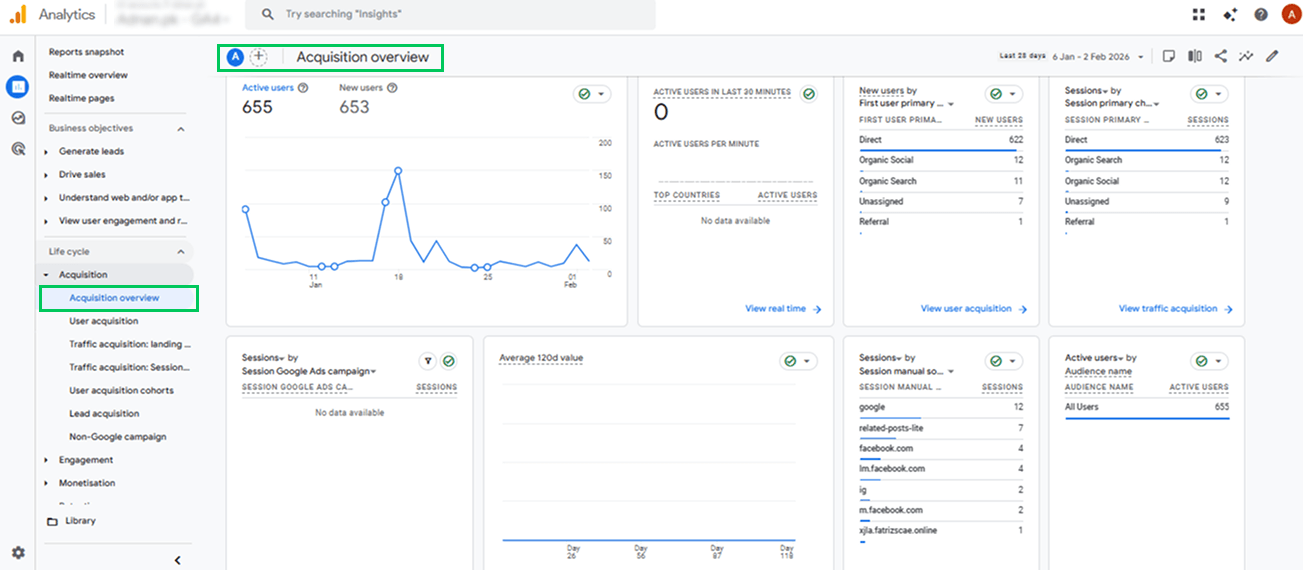
1. Acquisition Overview
- The Acquisition Overview report shows where your visitors come from, including search engines, social media, email, and other channels.
- Checking this report weekly helps small business owners identify which marketing channels are driving traffic that actually matters for your business.
- For example, if email traffic converts at 5% while social traffic converts at 1%, you know where to focus your marketing budget.
2. Engagement Overview
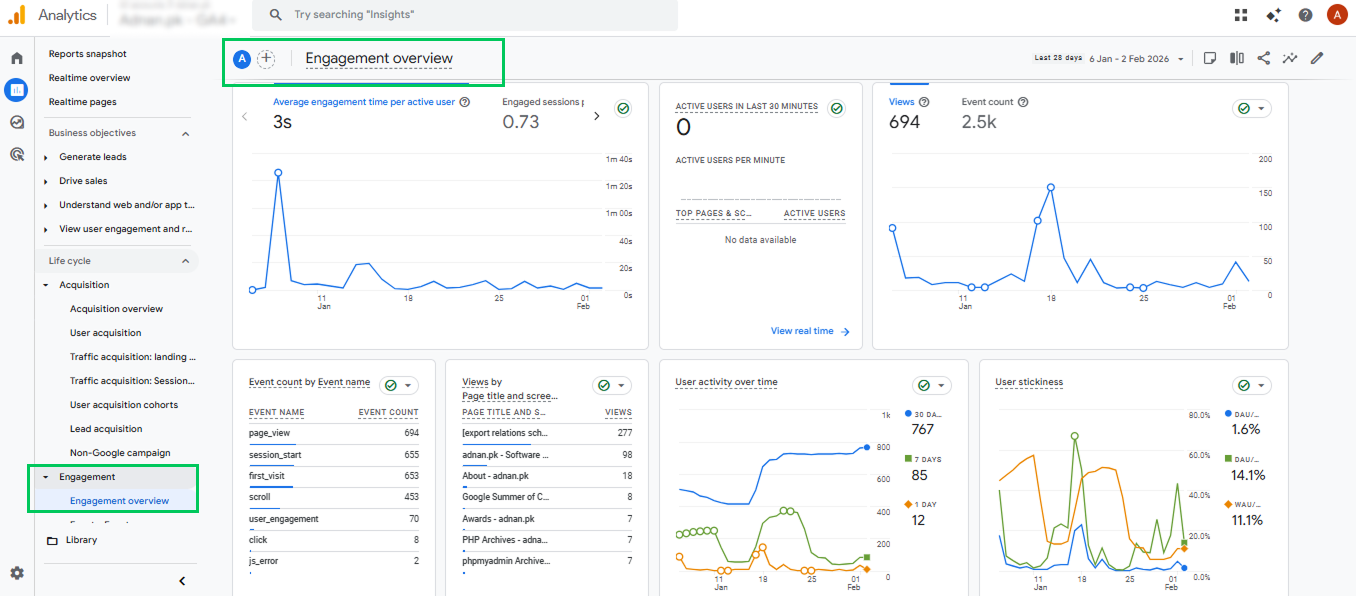
- The Engagement Overview report shows how visitors interact with your site, including engagement rate, average engagement time, and key events.
- Reviewing this report weekly helps you identify which pages keep visitors engaged and which ones lose them quickly.
- It clearly highlights high-performing content and identifies pages that need updates to drive conversions.
3. Conversions Report
- The Conversions Report shows how many users complete important actions, such as purchases, form submissions, or sign-ups.
- Checking this report weekly or monthly helps small business owners see which pages and campaigns are driving real results.
- For example, if a landing page receives high traffic but few sign-ups, this report clearly indicates that the CTA, content, or design needs improvement.
- So you can focus on actions that actually generate revenue or leads, helping you prioritize the improvements that matter most.
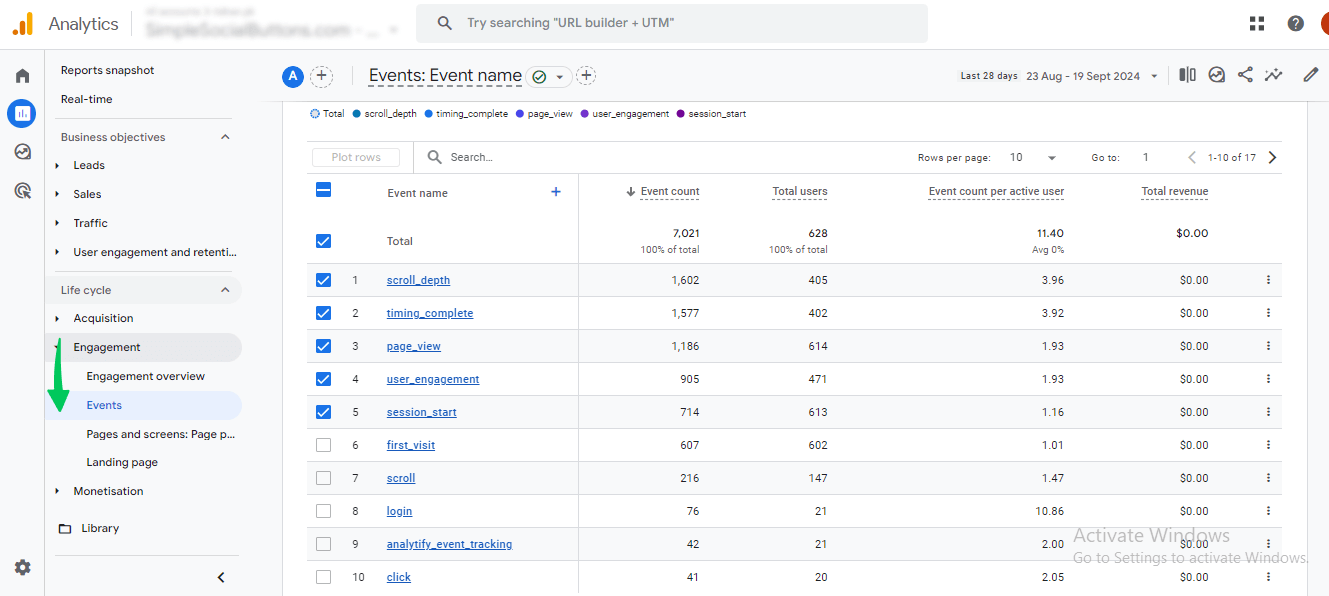
4. Pages & Screens
- The Pages & Screens report shows which pages or screens get the most traffic and engagement.
- Reviewing this report monthly helps small business owners spot opportunities to improve performance.
- For example, if a blog post receives high traffic but zero conversions, you can update its CTAs or promote it differently to increase results.
- This report shows which pages need improvement and which ones already perform well. So, you can fix underperforming content and design to keep users engaged and drive conversions.
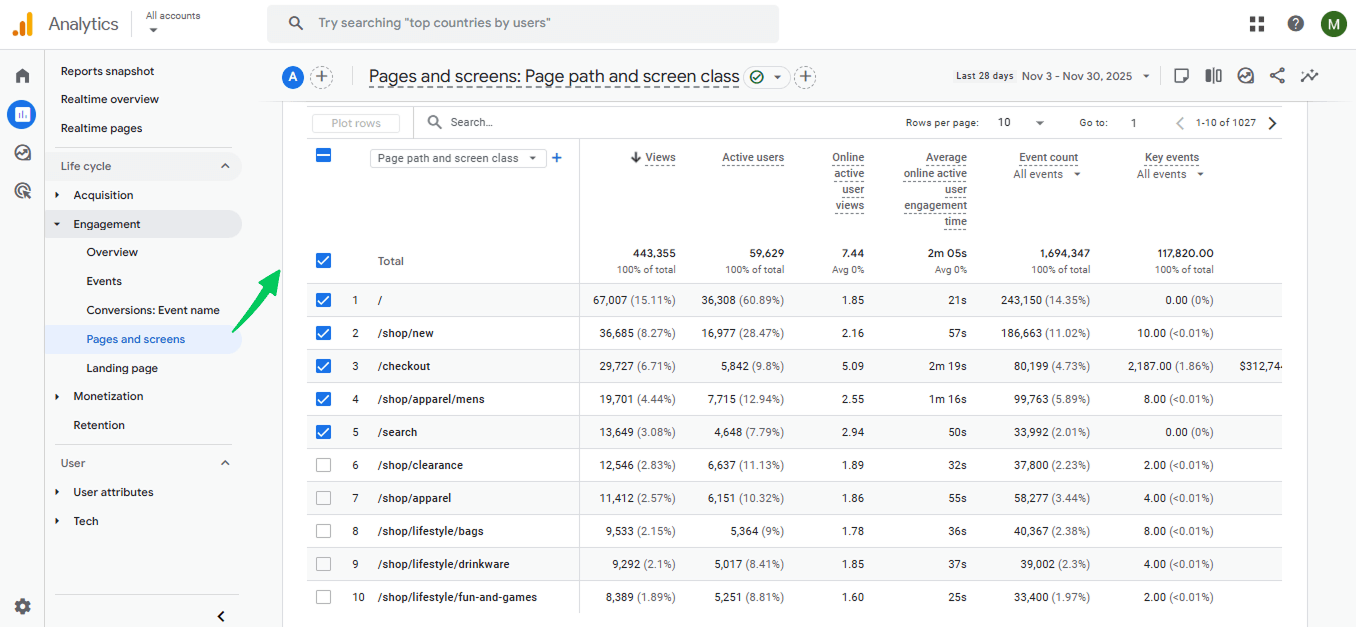
By regularly reviewing these reports and comparing performance, small business owners can identify which actions to prioritize and where to adjust their strategy.
Reports You Can Safely Ignore (At First)
- Advanced Explorations
- User Lifetime Reports
- Complex Funnel Explorations
Reason: These reports are detailed and can add noise before you’ve mastered the basics. For small businesses, starting simple with a GA4 dashboard helps you focus on clarity and actionable insights.
How Analytify Simplifies GA4 for Beginners and Small Businesses
Join 50,000+ beginners & professionals who use Analytify to simplify their Google Analytics!
GA4 collects powerful data, but many small business owners struggle to use it because the native interface is complex and time-consuming.
Analytify removes this friction by bringing GA4 data directly into WordPress, where business owners already manage their sites.
Instead of hunting through GA4 menus, Analytify shows key metrics in one place. It reveals what’s working and what’s not without requiring analytics expertise.
Traffic, engagement, and conversions are clearly labeled, so small business and their owners can quickly act on the data rather than interpret it.
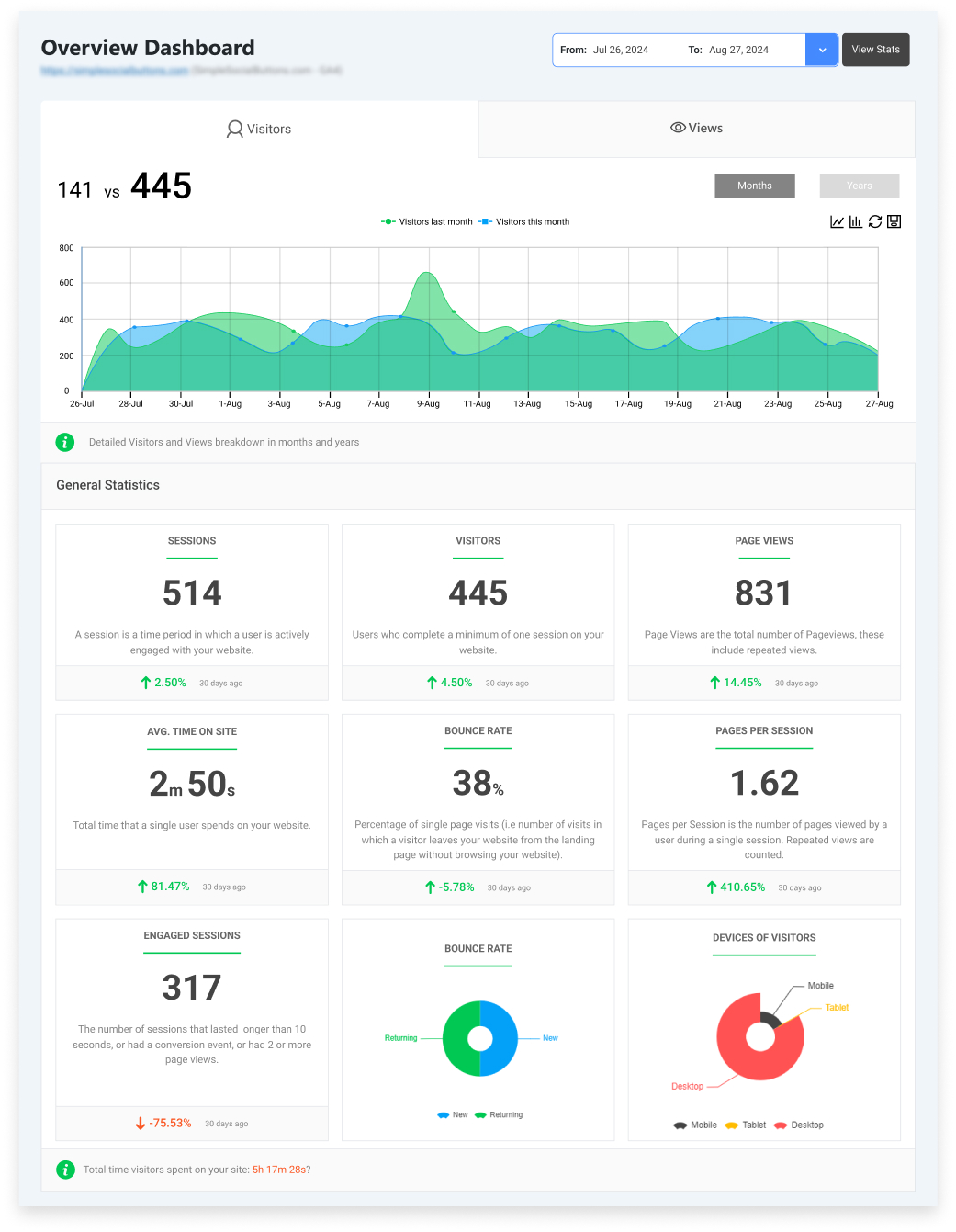
The biggest advantage is page-level reporting tied to website pages. Analytify shows:
- Which pages bring leads or sales
- Which pages get traffic but no conversions
- Which pages perform well and deserve more promotion
For example, A business owner can instantly spot a blog post that gets strong engagement but no sign-ups. Using these easy-to-read reports, they can improve the CTA, layout, or content to increase conversions.
They can also identify a product page that already converts. This report enables them to confidently drive more traffic to it through ads or email campaigns. In this way, Analytify helps small businesses make clear content and sales decisions.
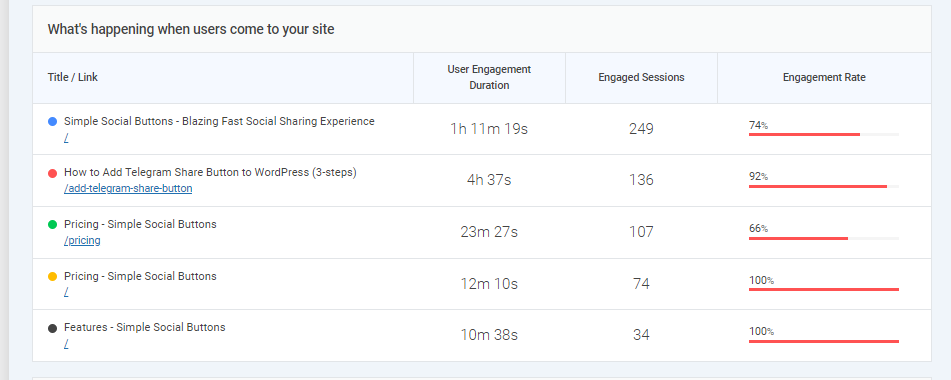
Analytify also connects key actions, such as form submissions or purchases, to key event dashboards. So, owners can see which pages and channels drive results.
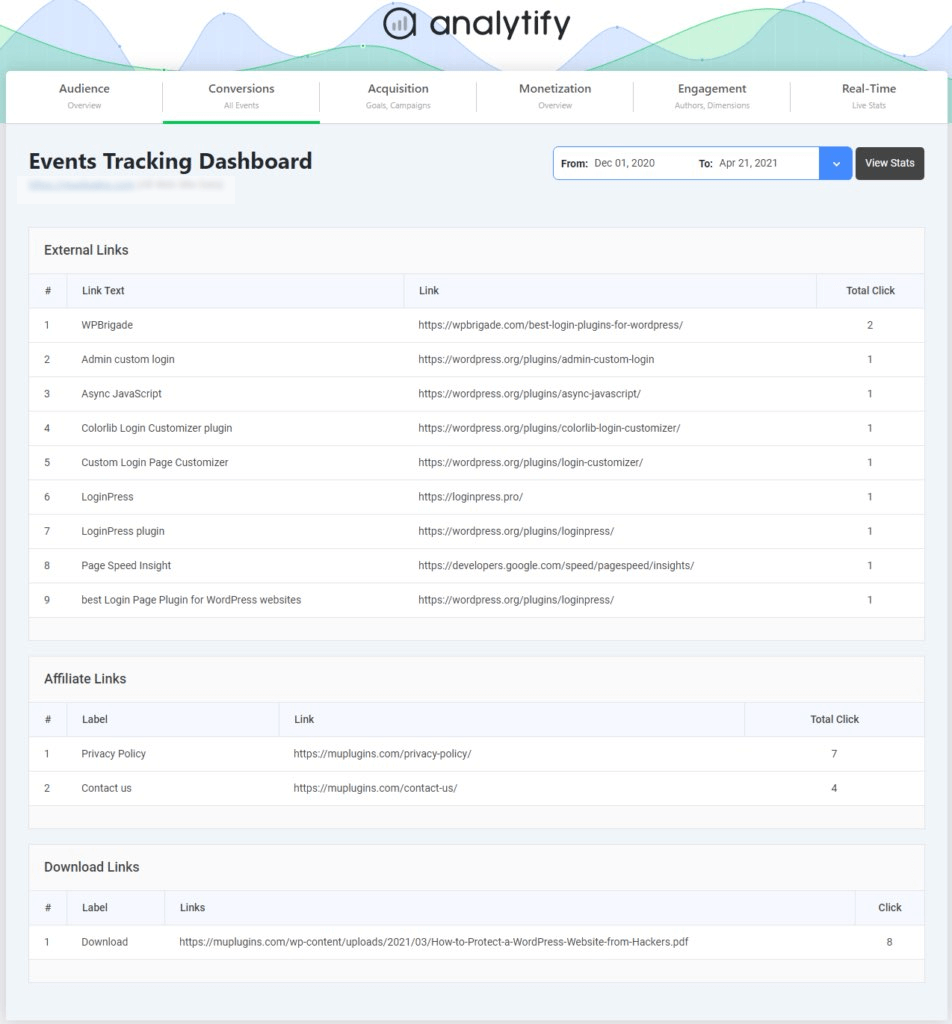
Traffic source reports clearly show whether search, social, or email brings valuable visitors.
For example, if social media drives significant traffic but no conversions, while email brings fewer visitors who actually buy or sign up, small business owners know which channel deserves more budget and effort.
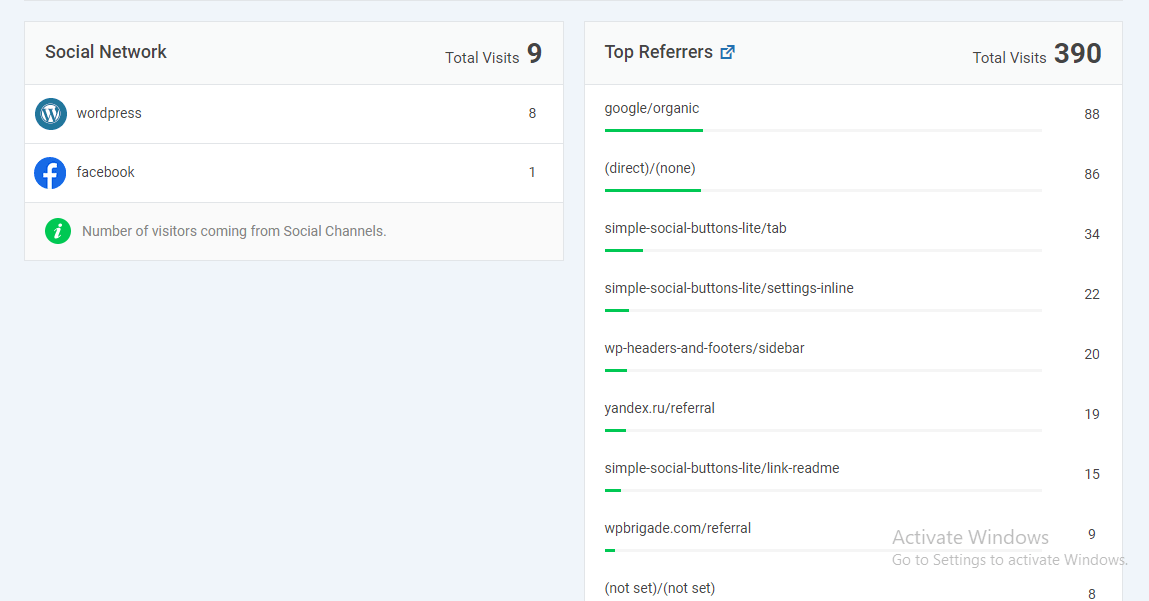
It shows user behavior, content performance, and conversions in a single view. This allows small businesses to connect marketing efforts directly to revenue without spending hours inside GA4.
GA4 Dashboard for Small Businesses: What a Simple Setup Looks Like
A good GA4 dashboard for small business isn’t packed with charts. It’s focused on clarity. The goal is to see what’s working at a glance, without digging through multiple reports or technical views.
Metrics to show on the first view
Your first dashboard view should highlight:
- Total users and engaged sessions
- Top traffic channels (search, social, email, referrals)
- Key events or conversions
- Top-performing pages or screens
This setup allows you to quickly spot trends, drops in engagement, or changes in conversion behavior, without advanced analysis.
Why fewer widgets lead to better decisions
Too many widgets create noise. When dashboards are overloaded, small business owners spend more time interpreting data than acting on it.
Fewer, well-chosen metrics make it easier to connect data to business decisions, such as improving content, adjusting marketing channels, or optimizing calls to action.
Analytify’s default GA4 reports are built around this exact structure. Instead of overwhelming users with complex dashboards, it focuses on essential metrics in a clean, readable format. This makes GA4 easier to understand and more useful for everyday business decisions.
Common GA4 Mistakes Small Businesses Make (and How to Avoid Them)
Using GA4 effectively can be tricky for small businesses, especially when starting with GA4 reporting. Here are some common mistakes and how to avoid them:
Trying to track every click or page view can overwhelm your reports. Focus on the key actions that matter most, like form submissions, purchases, or sign-ups.
- Obsessing Over Vanity Metrics
High pageviews or traffic spikes may look impressive, but they don’t always reflect real business results. Concentrate on metrics that show engagement and conversions.
- Ignoring Page-Level Performance
Failing to check how individual pages perform can mask problems. Use the Pages & Screens report to identify which pages keep visitors engaged and which need improvement.
- Checking Reports Too Frequently or Too Rarely
Reviewing data daily for everything can be confusing, while monthly checks may miss trends. Find a balanced schedule (weekly or monthly).
- Not Connecting Analytics to Business Actions
Data is only useful if it informs decisions. Always link GA4 insights to marketing, content, or website actions that drive growth and revenue.
- Overlooking Mobile and Device Behavior
Small businesses often ignore how users behave on mobile versus desktop, missing opportunities to optimize the experience.
By avoiding these mistakes, small businesses can use GA4 effectively without getting lost in unnecessary data.
Keeping reports simple, focusing on meaningful metrics, and connecting insights to real business actions make GA4 reporting for beginners practical and valuable.
Frequently Asked Questions About GA4 for Samal Businesses
1. What can you track with GA4?
GA4 lets you track how people find your website, what pages they visit, and which actions they take. You can measure visitors, traffic sources, engagement, and conversions, such as form submissions, purchases, and sign-ups.
2. How to use Google Analytics for a small business?
To use Google Analytics for small business, start simple. Set up GA4, track a few key actions (such as forms or purchases), and review basic reports, including Acquisition, Engagement, and Conversions. Using a GA4 dashboard for a small business helps you quickly view key metrics without digging through complex menus.
3. How to run a report in GA4?
To run a report, go to the Reports section in GA4 and select the report you need, such as Acquisition or Engagement. These built-in reports are ideal for GA4 reporting for beginners because they already show the most useful data in a simple format.
4. How to analyze GA4 data?
To analyze GA4 data, small businesses should keep it simple and focus on analytics metrics that directly support decisions. Start by reviewing traffic sources to see where visitors come from, then check engagement to understand what users do on your site. After that, review conversions to identify which actions drive real results.
5. Is GA4 easy to learn?
Yes, GA4 is easy to learn when you focus on the basics. Small businesses don’t need advanced features at the start. By using beginner-friendly reports and a clear dashboard, GA4 for small businesses becomes a practical tool for making better decisions.
Final Thoughts: GA4 for Small Businesses
In this guide, we started by explaining how GA4 for small businesses can provide focused insights without overwhelming complexity. We covered what small businesses need from GA4, including tracking meaningful actions such as form submissions, clicks, sign-ups, and purchases.
Next, we explored GA4 reporting for beginners, explained traffic, engagement, and conversion metrics, and highlighted the reports small businesses should use versus those they can ignore at first. We also discussed common GA4 mistakes and how to avoid them.
Finally, we showed how tools like Analytify simplify GA4, offering beginner-friendly dashboards and essential metrics. They also provide page-level statistics, enabling small businesses to make data-driven decisions efficiently.
GA4 doesn’t have to be complicated; with the right focus, it becomes a practical tool to grow your business.
For further understanding, you can read:
Which GA4 metric do you find most useful for your small business, and why? Share your thoughts in the comments below. We’d love to hear your experience!”