Analytics Fatigue: Why Teams Stop Using Data and How to Fix It (2026)

Do you feel overwhelmed every time you open your analytics dashboards? Many teams face analytics fatigue, a growing challenge in which too much data creates stress rather than clarity.
When dashboards are overloaded with metrics, alerts, and reports, decision-making slows, insights get lost, and teams stop using analytics altogether.
Understanding and addressing analytics fatigue is crucial for improving productivity, making smarter business decisions, and getting the most value from your data.
In this guide, we’ll explore what causes analytics fatigue, the psychological and practical effects of analytics overload, and clear strategies to simplify analytics and reduce dashboard fatigue.
Let’s get started!
Analytics Fatigue (TOC):
What Is Analytics Fatigue?
Analytics fatigue is the mental exhaustion that results from teams or individuals being exposed to too many dashboards, alerts, reports, and performance metrics without clear direction.
It starts when businesses track excessive metrics across different dashboards. Teams see clicks, impressions, conversions, engagement, and dozens of other numbers, but they are not sure which ones truly matter.
As the volume of data grows, clarity drops. Teams spend more time reviewing reports than making decisions, and key insights get lost in the noise.
Over time, this results in data overload, reduced adoption of analytics, and slower decision-making.
In simple terms, analytics fatigue occurs when data creates overload rather than clarity.
Why Teams Stop Using Analytics
Below are the main reasons why teams stop using analytics:
A. Too Many Metrics
When teams track too many numbers, focus gets lost. Vanity metrics look impressive, but do not guide real decisions. Instead of improving the analytics strategy, they create data overwhelm. Teams spend more time reviewing data sets than taking action.
B. Fragmented Tools
Using multiple platforms for data analysis creates switching fatigue. One tool shows traffic, another shows sales, and another shows ads. Constantly moving between systems makes data management stressful and inefficient.
C. No Clear Decision Framework
Sometimes data exists, but there are no clear action rules. Teams see reports but don’t know what to do next. Without a simple framework, analytics becomes passive rather than practical.
D. Poor Data Quality
If data is inconsistent, incomplete, or inaccurate, teams lose confidence. When numbers change unexpectedly or do not match across platforms, people begin to question the system. Once trust is broken, teams avoid using analytics.
E. Complex Dashboards
Some dashboards look impressive but are hard to understand. Too many charts, filters, and visual elements on one screen creates analytics dashboard fatigue. Users spend more time trying to understand the layout than understanding the insights.
The Psychology Behind Data Overload
Data overload is not just a technical problem. It is a human problem. Let’s break it down in a simple way:
- According to cognitive load theory, our brains can process only a limited amount of information at a time. When marketing teams look at too many metrics, charts, and reports, their mental load increases. Instead of quickly understanding insights, they feel tired and confused.
- When everything looks important, it becomes hard to choose. This leads to decision paralysis, a state in which teams delay action because they are unsure what to prioritize.
- Marketing teams often switch between dashboards, campaigns, and platforms for social insights. Each platform shows different datasets in different formats. This constant switching breaks focus. Over time, this causes data burnout.
Analytics adoption often fails because of these reasons.
- If users do not understand the metrics, they stop trusting them.
- If dashboards do not connect directly to business goals, the data feels irrelevant.
- When reports are not role-based, people see information that does not apply to their job.
When analytics feels confusing rather than helpful, teams gradually stop using it.
Signs of Analytics Dashboard Fatigue
Analytics dashboard fatigue happens when teams are overwhelmed by too much data and too many metrics. Here’s a simple checklist to identify it in your organization:
- Dashboards are rarely opened
Team members stop checking reports regularly because they find them confusing or overwhelming. - Manual data exports to Excel
Instead of using dashboards, teams download data and rebuild reports manually. This wastes time and reduces efficiency. - Meetings full of numbers but no decisions
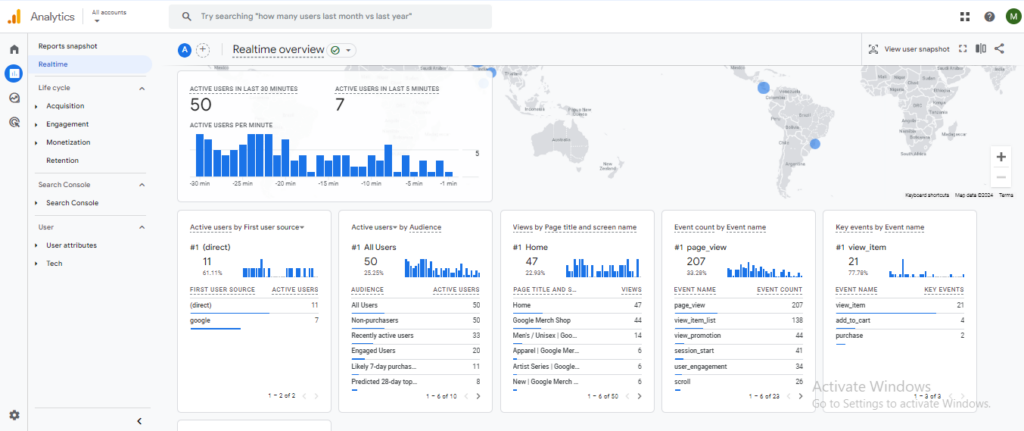
Reports are presented, but no clear actions are taken. Data is discussed without a clear outcome. - Too many metrics on one screen
Dashboards are crowded with charts and filters, making it hard to identify what really matters.
- Slow response to performance changes
Teams notice issues late because insights are buried in complex reports. - Confusion about which metrics matter
Team members are unsure which numbers guide decisions and which are just background data. - Low engagement with reporting tools
Only a few people actively use analytics platforms, while others avoid them.
If several of these signs appear, your team is likely experiencing analytics fatigue. It’s time to simplify dashboards and restore clarity.
How to Simplify Analytics (Core Solution)
If your team is experiencing analytics fatigue, the solution is not more data. The solution is clarity: getting by with simplified analytics.
Here is a practical step-by-step approach for overcoming complex analytics:
Step 1: Define Business Questions First
Before opening any dashboard or looking at any metrics, clearly define what you want to solve. Keep it simple and direct. Ask:
- What decision do we need to make right now?
- What specific problem are we trying to fix?
- How will we know if we succeeded?
For example, instead of checking every marketing metric, ask:
“Is our latest campaign generating enough sales?”
Now the focus becomes clear.
- You only need the numbers that answer that question, such as conversions and revenue.
- You do not need to review every click, impression, or secondary metric.
This approach removes confusion. It prevents teams from opening dashboards without purpose and getting lost in unnecessary data.
This keeps analytics simple, aligned with business goals, and free from data overwhelm.
Step 2: Reduce KPIs to Decision Drivers
Too many KPIs create confusion. When teams try to track everything, they struggle to see what really matters.
Instead of monitoring dozens of metrics, focus only on the numbers that directly influence business decisions. These are your decision drivers.
For most businesses, the main decision drivers are:
- Conversions: Are people taking the action you want?
- Revenue: Is the business actually earning money?
- Engagement: Are users actively interacting with your content or product?
- Retention: Are customers coming back?
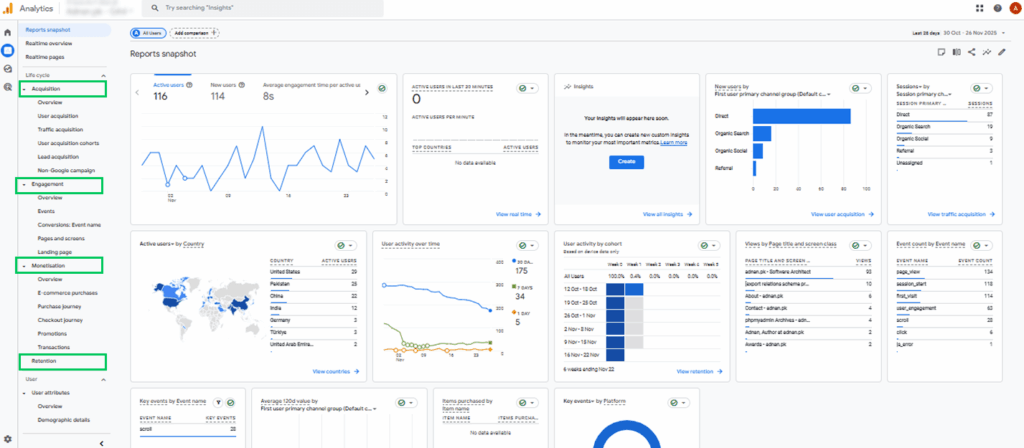
These four areas clearly show whether your efforts are working.
For example, high traffic may look good. But if conversions and revenue are low, traffic alone does not help. In this case, conversions matter more than page views.
When you reduce KPIs to decision drivers:
- Reports become easier to read
- Meetings become more focused
- Decisions become faster
This simple filtering removes noise and reduces analytics fatigue.
Step 3: Use Role-Based Dashboards
Not everyone needs to see everything.
- Marketing teams need campaign performance and engagement data.
- Sales teams need lead quality and conversion data.
- Leadership needs revenue trends and growth metrics.
When all roles see the same complex dashboard, confusion increases.
Role-based dashboards simplify the experience and improve the adoption of analytics. Each team member sees only what is relevant to their responsibilities.
Step 4: Automate Key Reports
Manual data extraction is frustrating and time-consuming. Exporting data into spreadsheets every week adds to data burnout.
- Automate recurring reports to deliver insights consistently and accurately.
- Automation improves data management, reduces errors, and frees teams to focus on strategy instead of formatting numbers.
Step 5: Remove Redundant Metrics
Many dashboards contain duplicate or low-value metrics. These add noise and increase cognitive load.
Audit your analytics platforms regularly. Remove metrics that:
- Do not connect to goals
- Do not influence decisions
- Repeat information already shown elsewhere
Cleaner dashboards mean faster understanding and greater confidence in decisions.
Simplifying analytics means removing unnecessary data and focusing only on what truly matters. When teams reduce noise and keep dashboards clear, they can move toward overcoming complex analytics and eliminating analytics fatigue.
From Data Overload to Data Clarity
Many teams focus on collecting as much data as possible. But more data does not necessarily lead to better decisions. To move from analytics fatigue to actionable insights, teams need to focus on clarity at every step:
1. Data Collection
This is about gathering numbers from all sources, website traffic, ad campaigns, social media, CRM, and more. Collecting data is easy, but too much without focus leads to data overwhelm.
2. Data Interpretation
Data alone is meaningless. Interpretation is the process of making sense of numbers. For example, a high click-through rate might look good, but does it lead to sales?
Marketing teams often struggle here when dashboards are confusing or metrics are not tied to goals.
3. Decision Activation
This is where insights turn into action. Clear interpretation enables teams to make faster, smarter decisions, such as optimizing campaigns in real time or adjusting budgets based on performance. Without this step, analytics adoption fails.
Introducing Clarity-First Analytics Strategy
A clarity-first analytics strategy prioritizes understanding over volume. It focuses on:
- Real-time insights for quick reactions
- Key metrics like click-through rates that directly impact goals
- High-quality, trustworthy data across platforms
- Streamlined dashboards on analytics platforms
By designing analytics around clarity, teams can move from analytics overload to meaningful, actionable insights, reducing fatigue and improving adoption.
How Analytify Helps Reduce Analytics Fatigue
Join 50,000+ beginners & professionals who use Analytify to simplify their Google Analytics!
Analytify is a simple solution for teams struggling with analytics fatigue. It is the best Google Analytics plugin for WordPress, seamlessly integrating with GA4 to display all essential metrics in one place.
- All Key Metrics in One Dashboard: View traffic, conversions, engagement, and other core metrics directly inside WordPress. There’s no need to switch between multiple tools.
- Focus on What Matters: Only the metrics that drive decisions are displayed. This removes distractions and keeps reporting simple.
- Easy to Understand: Clean, straightforward visuals give a clear snapshot of campaigns, website performance, and user behavior without confusing charts or unnecessary details.
- Quick Decisions: Insights are available at a glance, enabling teams to act faster and optimize campaigns immediately.
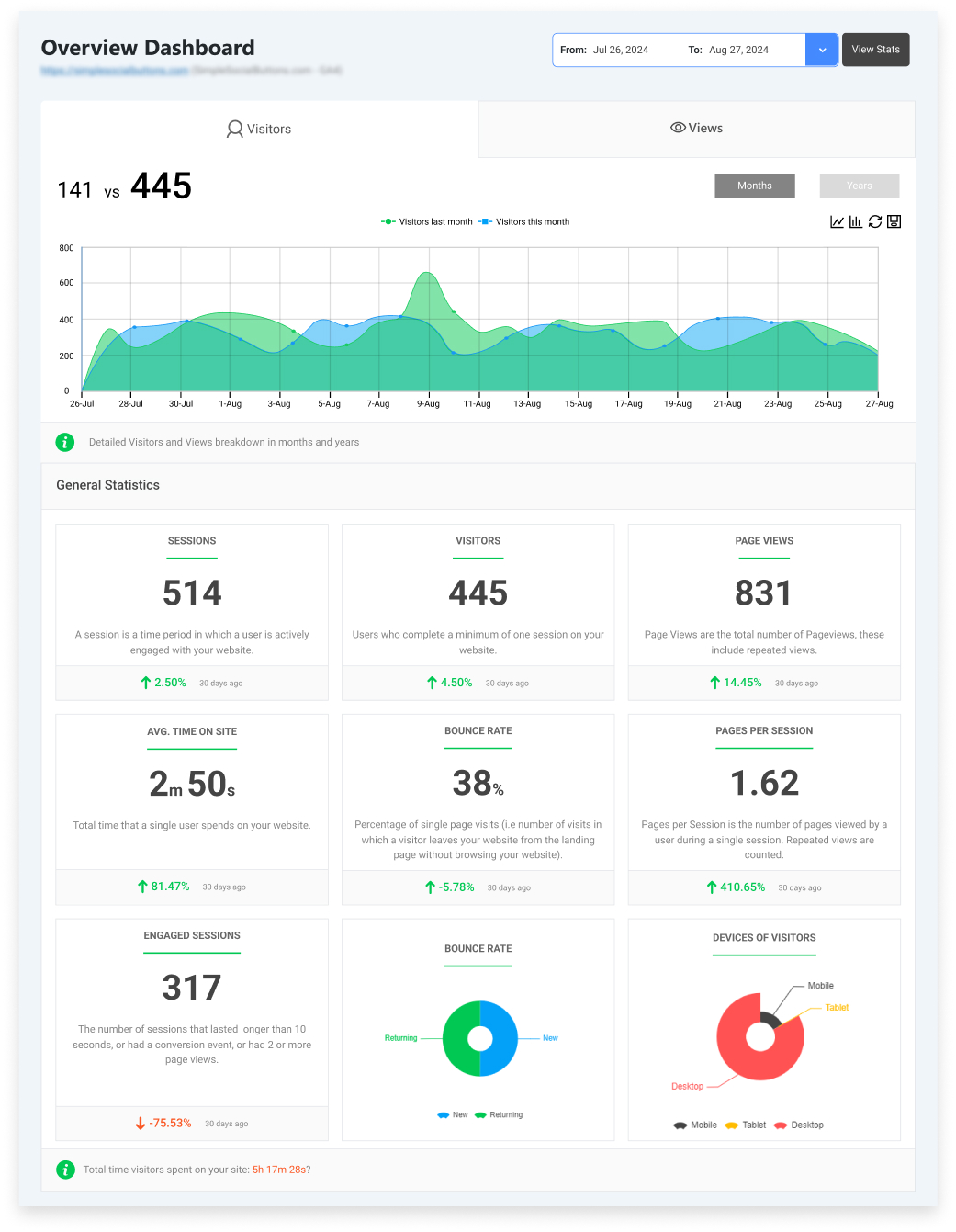
By keeping data simple, clear, and actionable, Analytify solves dashboard fatigue and helps teams make confident decisions without overcomplicating analytics.
Analytics Adoption and Fatigue
Analytics fatigue directly affects how teams adopt and use analytics tools. When dashboards are cluttered, metrics are confusing, or reports are hard to understand, teams feel overwhelmed and avoid the tools altogether.
- Teams avoid complex tools: Overloaded dashboards and unclear metrics make analytics feel like extra work instead of help.
- Usage drops: When tools are frustrating, team members stop checking them regularly.
- ROI decreases, Ignored insights mean missed opportunities and lower returns from your analytics platforms.
Simplifying analytics can reverse these effects:
- Improved adoption: Clear, focused dashboards encourage regular use.
- Higher engagement: Teams interact with the data that matters to their roles.
- Better decision confidence: Simple, reliable insights make it easier to act quickly and effectively.
By reducing analytics fatigue, organizations can increase adoption, boost engagement, and ensure that analytics delivers real value.
Practical Framework: The Clarity Loop
To overcome analytics fatigue and improve adoption, teams can follow a simple, repeatable process called the Clarity Loop, given below:
- Collect Only Necessary Data
Focus on metrics that truly matter to your goals. Avoid tracking every number, which creates overwhelm. - Analyze Against Goals
Compare data to key objectives. Look for trends, gaps, and opportunities that directly impact performance. - Decide Based on Thresholds
Set clear benchmarks for action. Know which numbers require immediate attention and which are for monitoring. - Act Quickly
Implement changes as soon as insights indicate a need. Fast action keeps strategies relevant and effective. - Review Impact
Measure results after taking action. Use this feedback to refine data collection and improve future decisions.
Analytics Fatigue: Frequently Asked Questions
1. What is data fatigue?
Data fatigue is the mental tiredness that happens when people deal with too much data for too long. When teams constantly review dashboards, reports, alerts, and metrics, it becomes overwhelming. Instead of helping make decisions, the data becomes stressful and confusing.
2. What are the early signs of analytics fatigue?
Early signs include ignoring dashboards, exporting data manually, confusion in meetings, and slow reactions to trends. These signals show growing analytics fatigue.
3. How can teams reduce data usage?
Teams should not try to reduce important data; they should reduce unnecessary data. Here’s how:
Track only metrics linked to business goals
Remove duplicate or low-value KPIs
Use simple, role-based dashboards
Automate regular reports instead of manual exports
Review data weekly with a clear purpose
4. Do teams handle too much data?
Yes, many teams deal with more data than they actually need. Modern analytics platforms automatically collect large datasets. Without a clear strategy, teams end up reviewing everything instead of focusing on decision-driving metrics. This leads to analytics fatigue and low adoption.
5. How can organizations improve analytics adoption?
To improve analytics adoption, businesses must simplify their approach. Focus on essential KPIs, use role-based dashboards, remove unnecessary metrics, and align reports with business goals. By doing so, teams can reduce analytics fatigue.
Analytics Fatigue: Final Thoughts
Analytics fatigue happens when teams are overwhelmed by too many dashboards, reports, and metrics, making it hard to focus and act. This often leads to confusion, slow decision-making, and low engagement with analytics tools.
Teams stop using analytics when they track too many metrics, switch between fragmented tools, face poor data quality, or deal with overly complex dashboards. Human factors like cognitive overload and decision paralysis further worsen the problem.
The solution lies in simplifying analytics. Start by defining clear business questions, focusing only on key metrics that drive decisions, using role-based dashboards, automating reports, and removing redundant data. A clarity-first approach ensures teams can quickly interpret insights and act confidently.
Tools like Analytify help by bringing essential metrics into one simple dashboard, providing a clear overview and enabling faster decisions. By reducing noise and focusing on what matters, teams can overcome analytics fatigue and make data more actionable and useful.
For further understanding, you can read,
- GA4 for Small Businesses: What to Track and How to Read Reports
- How to Spot and Fix Content Decay Using Google Analytics Data
How is your team handling analytics overload, and what steps have you taken to reduce fatigue? Let us know in the comments!