
How to Create an Email Newsletter? From Subscriber Strategy to Send

To create an email newsletter, choose an email marketing tool, build a subscriber list, design a template, write the content, schedule the send, and track the results. I show you each step, using Mailchimp as the example and Analytify to measure the traffic your newsletter sends to your site.
Email newsletters give you direct access to your audience’s inbox, and no feed algorithm decides who sees your message. A newsletter helps you build relationships and drive consistent traffic to your site.
This guide is for anyone who runs a blog, online store, or business website and wants to send a first newsletter. The steps run from choosing a tool to sending your first campaign, and they need no code.
How to Create an Email Newsletter (TOC):
What Is an Email Newsletter?
An email newsletter is a regularly sent email to your subscribers that contains updates, insights, promotions, or personalized content. It’s your way to stay connected with your audience and keep your brand top of their mind. Here are some ways you can use newsletters:
- To announce new blog posts or products
- To share company updates
- To educate readers with valuable tips
- To offer discounts or special deals
There are many different types we can learn how to create an email newsletter style, some of which include:
- Promotional newsletters: Focus on sales and offers
- Content newsletters: Shares blog posts, videos, or tutorials
- Curated newsletters: Collect the best industry resources
- Community newsletters: Engage members or subscribers
For example, Analytify’s Newsletter brings readers back to your site weekly with their latest content.
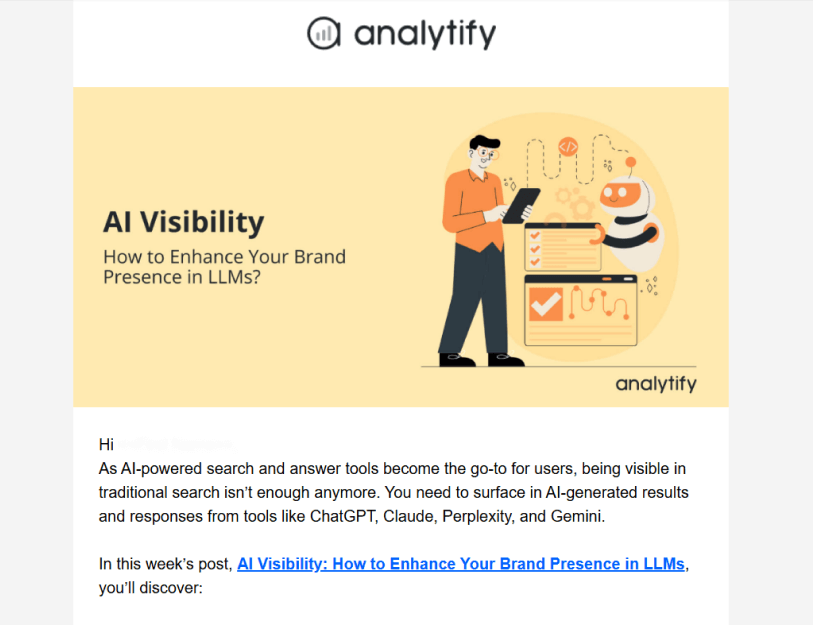
This strategy builds long-term traffic and trust with your pre-existing and other new potential customers.
Why You Should Start an Email Newsletter
In 2026, learning how to create an email newsletter isn’t optional, but it’s a strategic move. In this section, I will explain some of the top reasons (with proof) why launching an email newsletter is a smart way to improve retention and growth for your organization. So let’s begin!
- It gives you direct communication with your readers. Unlike social-platform posts buried in feeds or stories that vanish in 24 hours, a newsletter lands in someone’s inbox. Readers check their inboxes often. As of 2025, one source puts the average open rate across industries at about 42.35%.
- The engagement and conversion potential of email remains far stronger than that of most social media channels. One source reports that for every $1 spent on email marketing, businesses see an average return of around $36. That is a return of about 36 to 1 on each dollar spent.
- Email is ideal for building brand trust and driving long-term traffic. Since people are more likely to open, read, and act on messages in their inbox, a well-crafted newsletter helps keep your brand top-of-mind, nurture relationships, and bring visitors back to your website repeatedly. With email usage projected to hit nearly 4.5 billion worldwide in 2026, your newsletter becomes a reliable, owned asset for your company.
How to Create an Email Newsletter (Step-by-Step Guide)
Creating an email newsletter takes six steps: pick a tool, build a list, design a template, write the content, schedule the send, and track results. With Mailchimp, you can design emails, automate campaigns, and track results without code. The steps below use Mailchimp and a WordPress site.
Step 1: Choose an Email Marketing Tool
Pick a reliable email marketing platform. Some popular beginner-friendly options include:
- Mailchimp: It is perfect for beginners; it offers drag-and-drop templates, automation, and audience segmentation.
- Brevo: It’s an excellent choice for WordPress users who want to manage everything inside their dashboard.
- Constant Contact: It is known for its simplicity and strong customer support.
- ConvertKit (now called Kit) is best for bloggers and content creators who want advanced automation.
If you run a WordPress site, plugins like Mailchimp for WordPress, Brevo, or Kit (formerly ConvertKit) connect your site to these platforms. For this tutorial, I will use Mailchimp to demonstrate how to create an email newsletter.
Pro Tip: Use Analytify to track how much traffic your newsletters bring to your GA4 statistics, right inside your dashboard.
Step 2: Build Your Subscriber List
To start in Mailchimp, you will need to register for an account. You can check out their plans and choose the free plan if you’re just getting started.
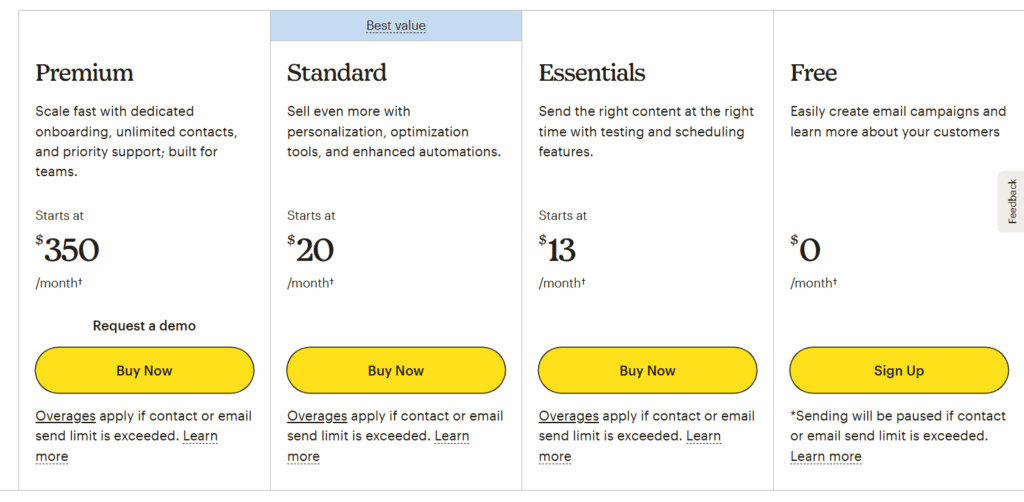
Once your Mailchimp account is ready, it’s time to start collecting subscribers, also known as curating your mailing list. A quality list beats a large one because it contains people genuinely interested in your content. Build your list with these steps:
- Add Signup Forms
You can use Mailchimp’s Embedded forms to collect emails from your site visitors and place them in high-visibility areas, such as your homepage, footer, or sidebar.
- Use Popups and Landing Pages
MailChimp also lets you create beautifully designed pop-ups that sync.
- Stay GDPR-Compliant
Always include consent checkboxes and clear privacy messaging. Also, enable double opt-in in Mailchimp so subscribers confirm their sign-up via email.

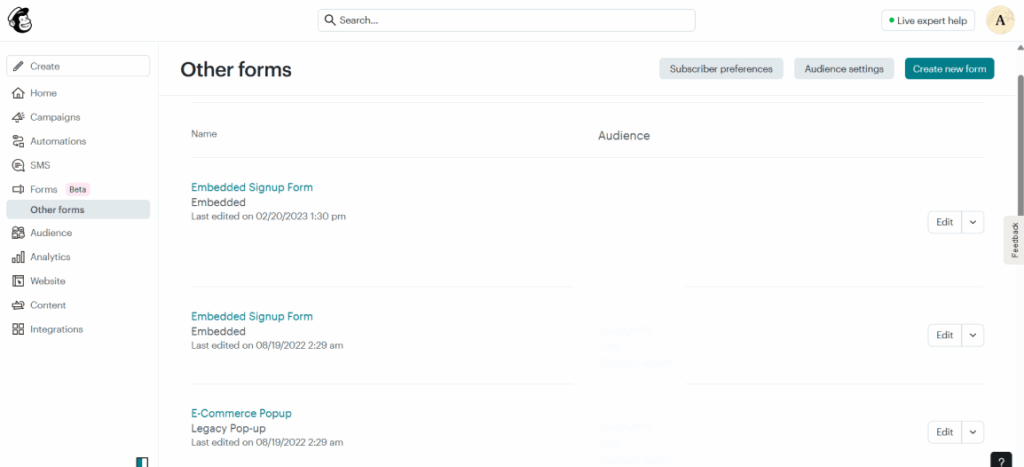
In Mailchimp, click Forms, then Other forms, then Create new form, then Create embedded form. Customize the form, generate the code, and paste the code into a Custom HTML block on your WordPress page or widget area.
Step 3: Learn How to Create an Email Newsletter
Design your email newsletter in Mailchimp’s drag-and-drop editor, which offers dozens of ready-made templates you can customize.
Steps to Design in Mailchimp:
- Go to Campaigns >> Email Templates >> Create Template.
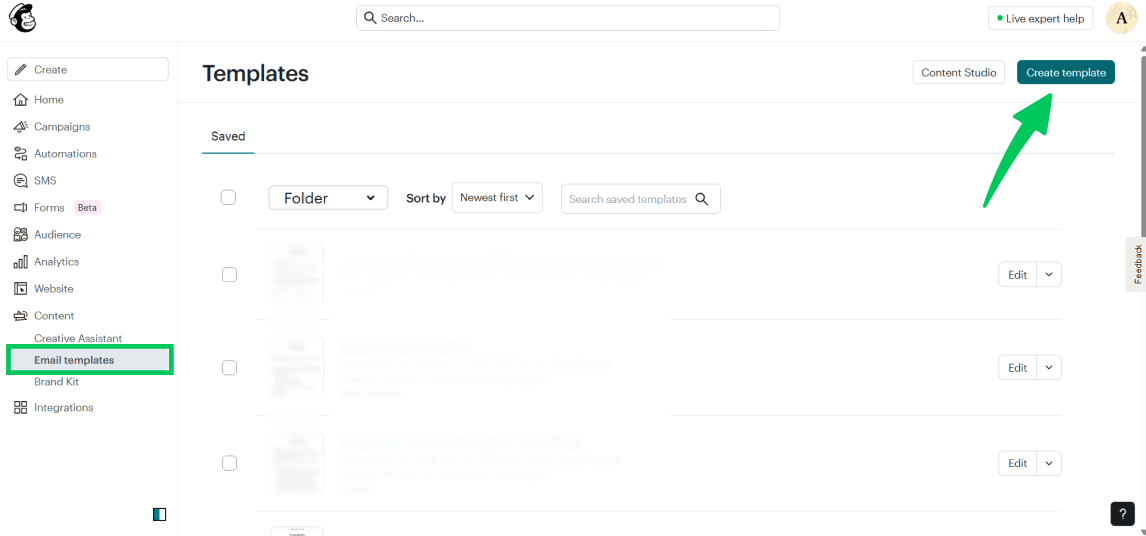
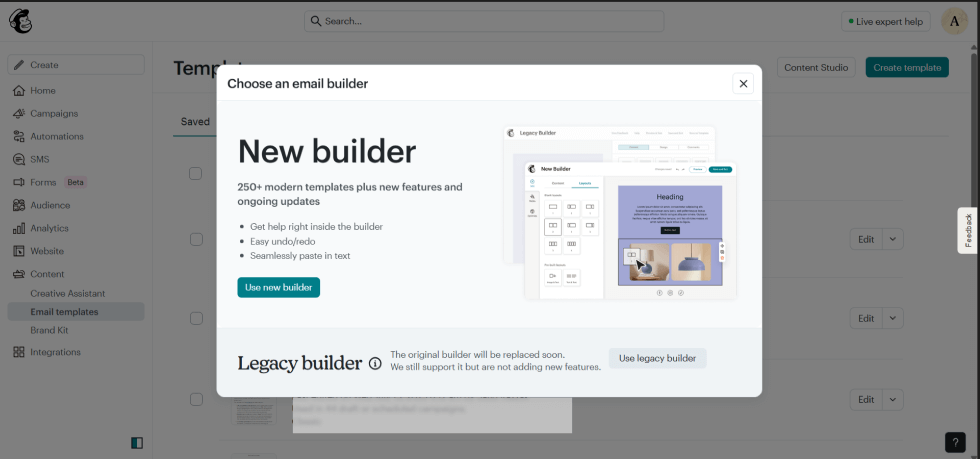
- Choose a pre-built layout or start from scratch.
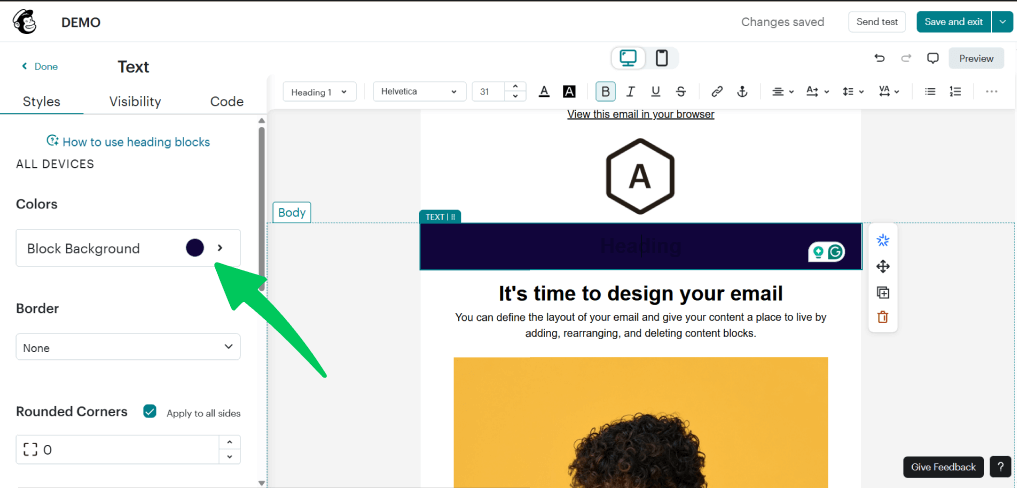
- With the builder option, you can add suitable colors to reflect your brand identity.
You can also add images and videos to your mail as you wish.
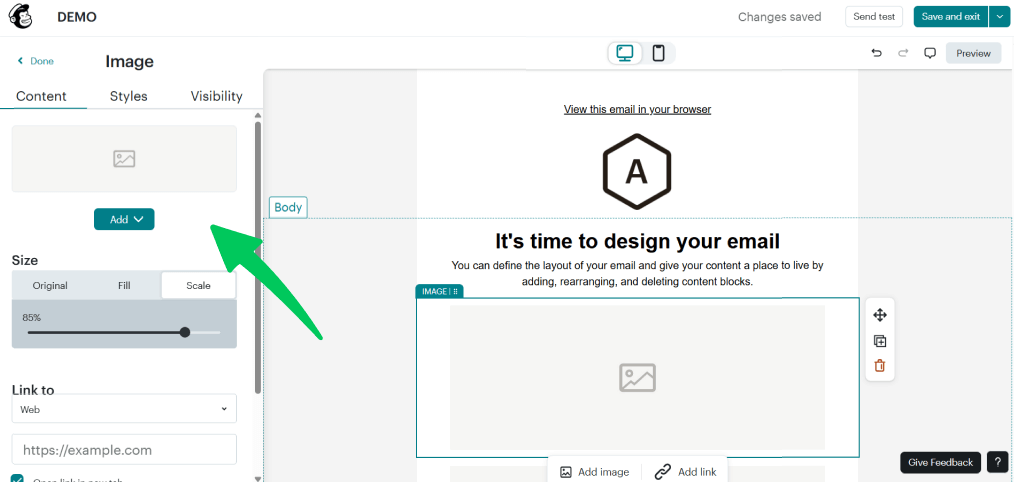
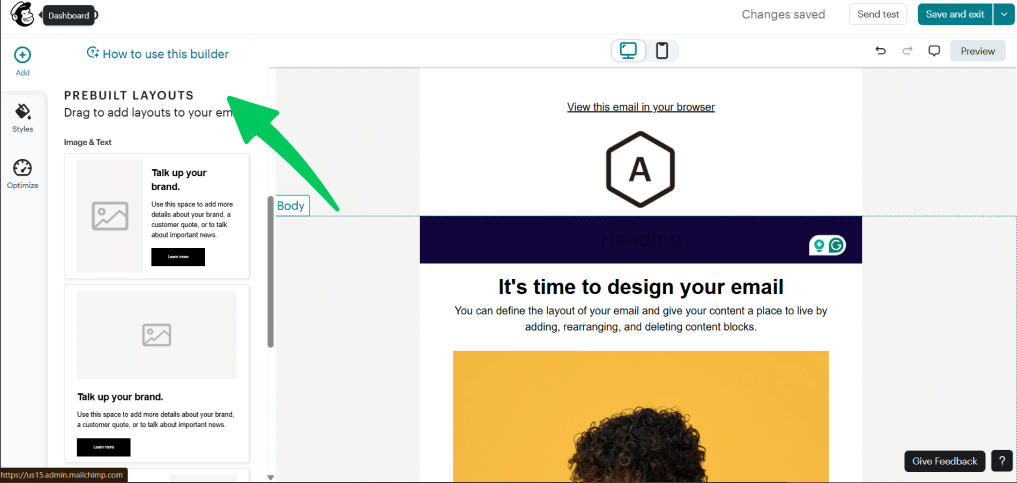
Mailchimp also provides users with pre-built layouts they can try and edit to personalize their email newsletter.
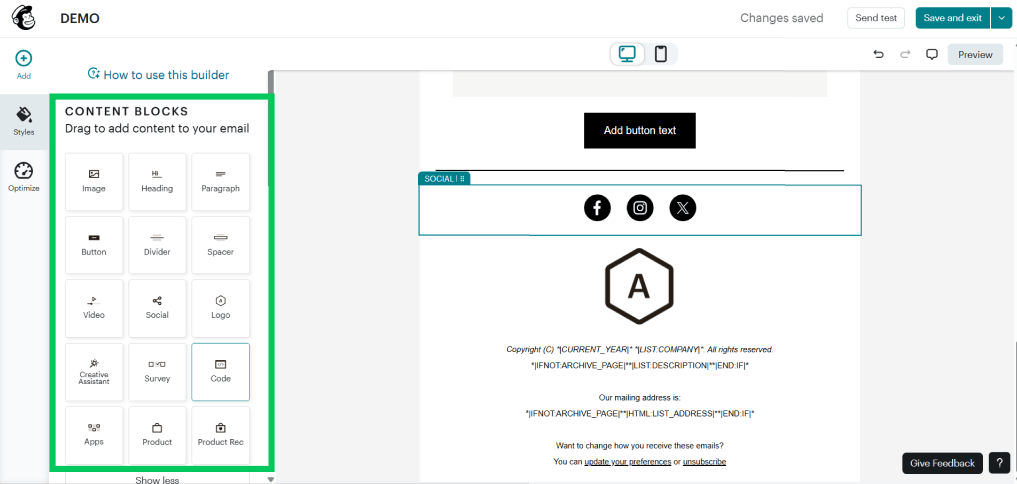
Other content blocks included in the builder are a custom logo, social logins, and connected apps.
Some design tips to keep in mind while designing your email template:
- Keep it consistent: Match your website’s colors and typography.
- Make it mobile-responsive: About 26-78% of email opens happen on mobile, depending on your audience. Test your design on a small screen.
- Please keep it clean: Use whitespace and limit each email to one main call to action (CTA).
If you’re using WordPress builders like Elementor, you can design branded sections and export them as images for your emails while also maintaining a consistent look across channels.
Step 4: Write Content That People Want to Read
A visually appealing design grabs attention, but it is your content that keeps readers coming back. When writing your newsletter:
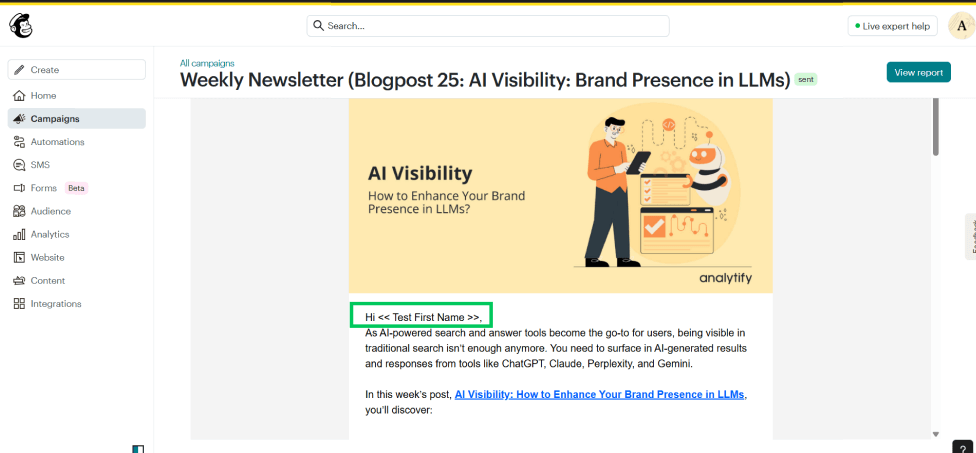
- Personalize it. Use your subscriber’s first name. Mailchimp lets you add merge tags like Hi, [FNAME] automatically.
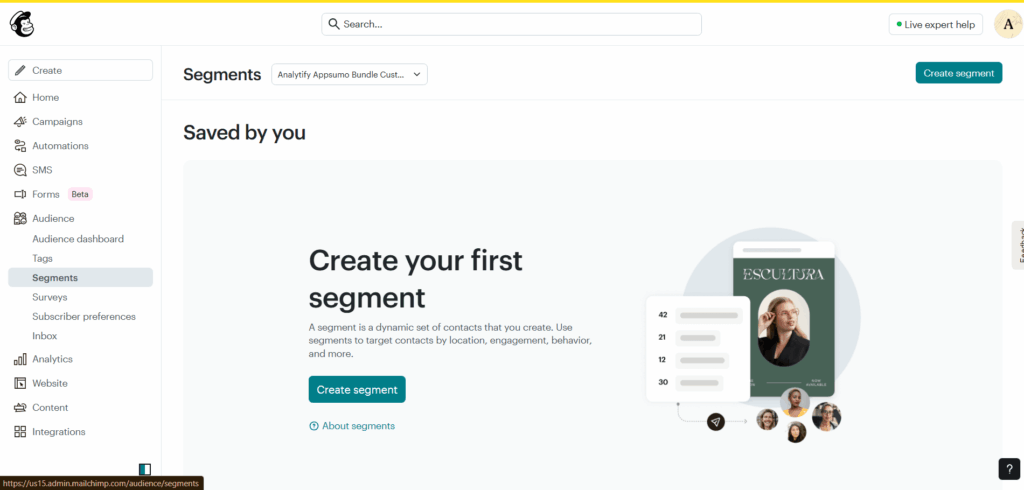
- Segment your audience. Send tailored messages, e.g., new subscribers receive a welcome series, and existing customers receive product updates.
- Stay concise. Keep paragraphs short and focused.
- Provide value. Share helpful insights, new blog posts, or exclusive offers.
Step 5: Schedule and Send Your Newsletter
Timing is everything. Even the best content won’t perform if it hits the inbox at the wrong moment.
Best sending times: Many senders choose midweek, Tuesday to Thursday. Test send times with your own audience.
In Mailchimp:
Go to Campaigns >> Create.
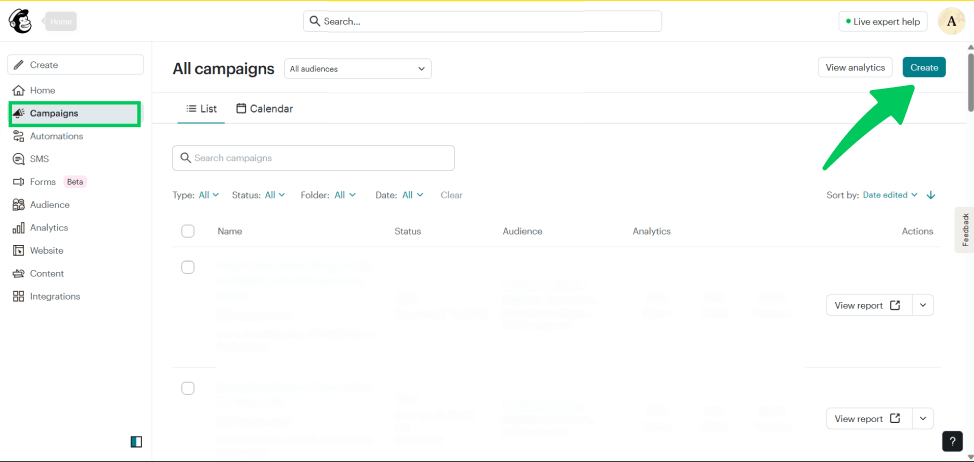
Then navigate to Regular Email and click on Design Email.
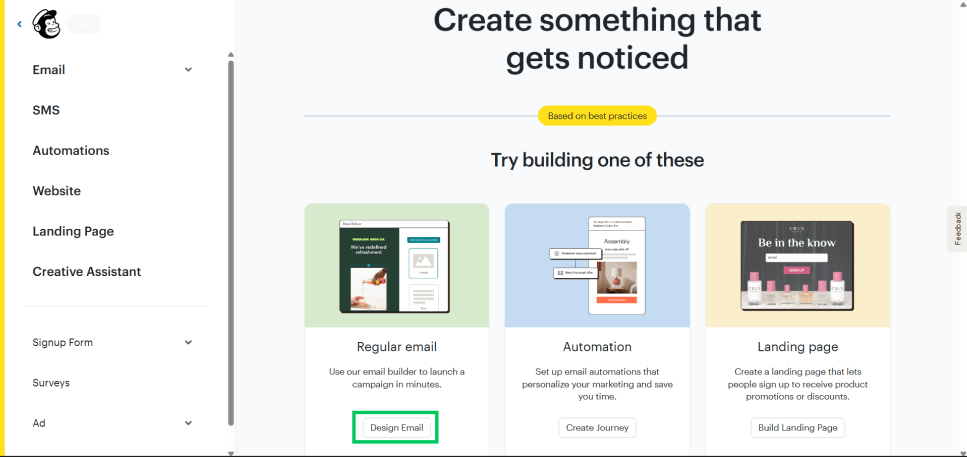
Choose your audience and template.
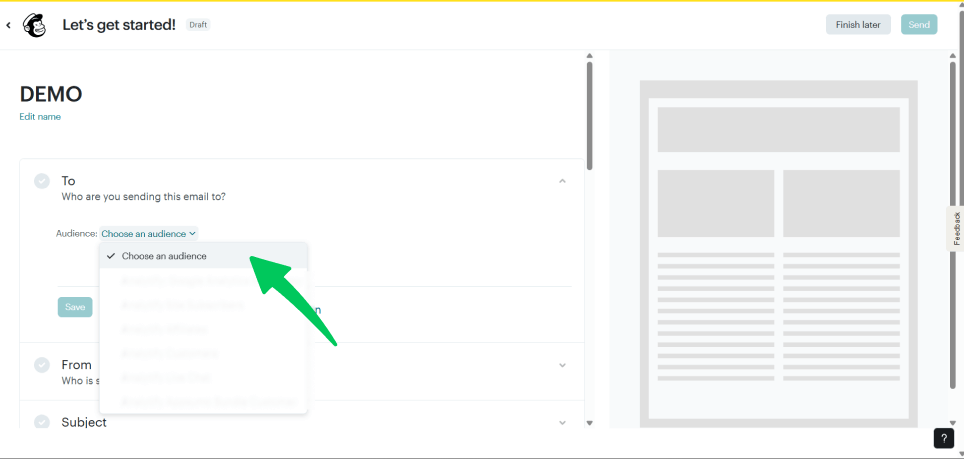
Then write your subject line and preview text. The subject line should be clear and concise.
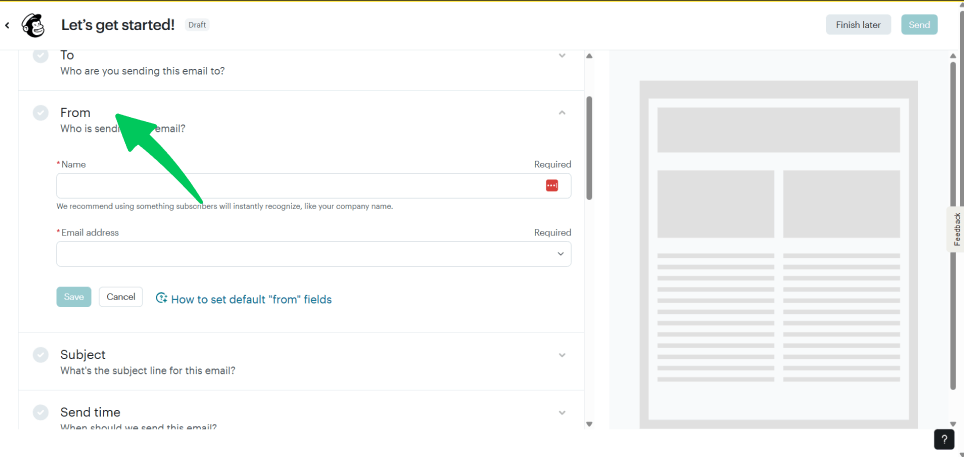
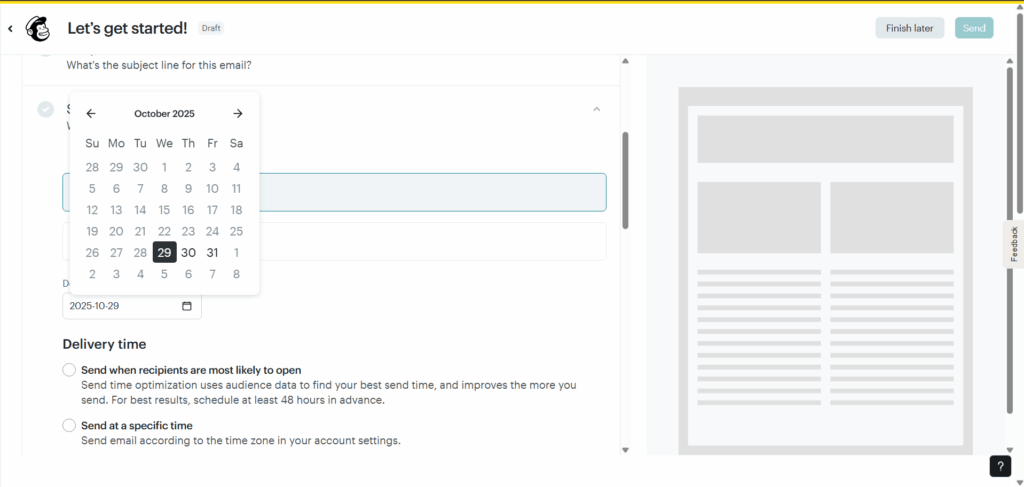
Mailchimp’s Send Time Optimization finds the time when recipients are most likely to open your email. It is included with the Standard plan or higher and is not available for automated emails.
Step 6: Track and Improve Performance
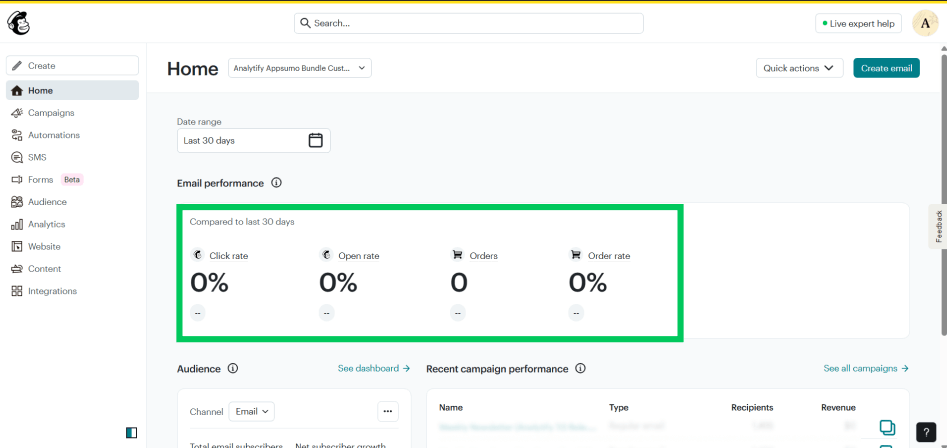
Once your newsletter goes live, the next step is analyzing how it performs. Mailchimp provides in-depth reports showing open rates, CTR, and others, as shown below in the screenshot:
Use these insights to improve your next campaign, for example, test new subject lines or switch up CTA placement. But if you are looking for even deeper insights, integrate Mailchimp with Google Analytics and monitor performance using Analytify in WordPress.
Here’s how to do it:
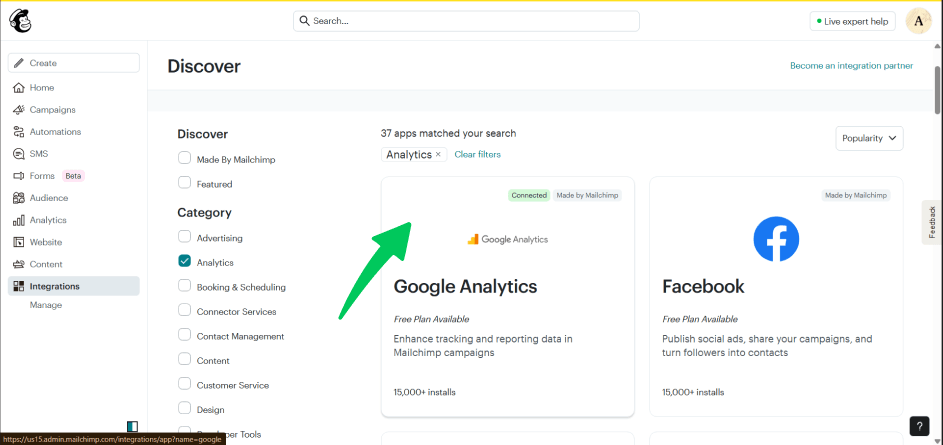
In Mailchimp, go to Integrations, click Google Analytics, and click Connect. Then, in the Settings & Tracking section of the email builder, check Google Analytics link tracking and save.
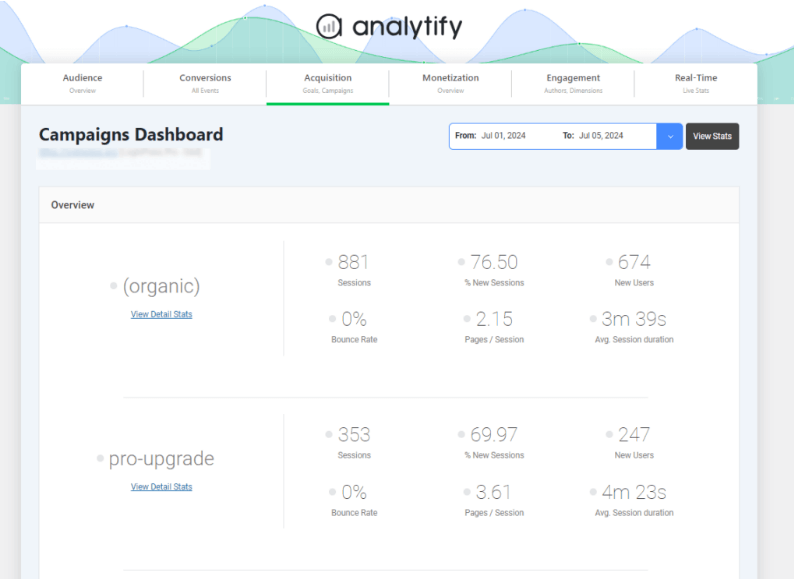
In WordPress, install and activate Analytify. Then visit Analytify >> Campaigns Report to see exactly how much traffic came from your newsletter.
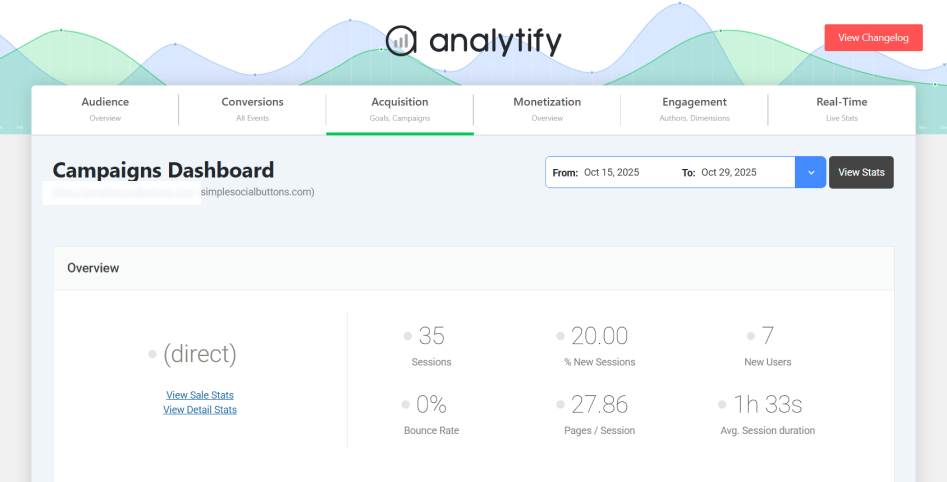
Campaign tracking shows which channels drive the most engaged visitors and conversions.
Tracking Newsletter Performance with Analytify
Join 50,000+ beginners & professionals who use Analytify to simplify their Google Analytics!
To track newsletter performance in WordPress, use Analytify to see GA4 email performance data directly in your WordPress dashboard.
With Analytify, you don’t need to log into GA4 or deal with confusing data tables. Everything you need to know about your email marketing performance is presented in easy-to-read reports right inside WordPress.
Here’s how to do it:
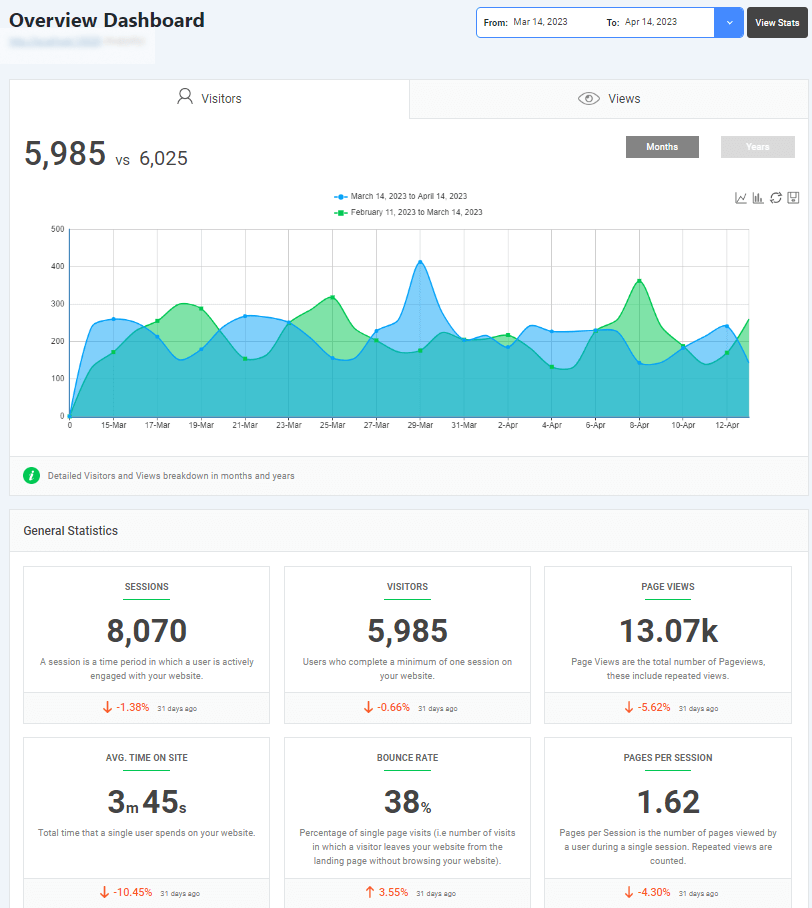
1. Connect Analytify to your site. The setup takes just a few clicks to authenticate with your Google Analytics account. The main dashboard in Analytify provides all the basic WordPress metrics.
2. Head to the Campaigns tab to track your UTM links and see which newsletters are driving the most visitors. For more on UTM links, see the detailed guide: GA4 UTM Parameters [An Ultimate Guide] 2025.
3. Navigate to the Acquisition report to identify where your subscribers come from and which campaigns lead to conversions, whether it’s sales, sign-ups, or downloads.
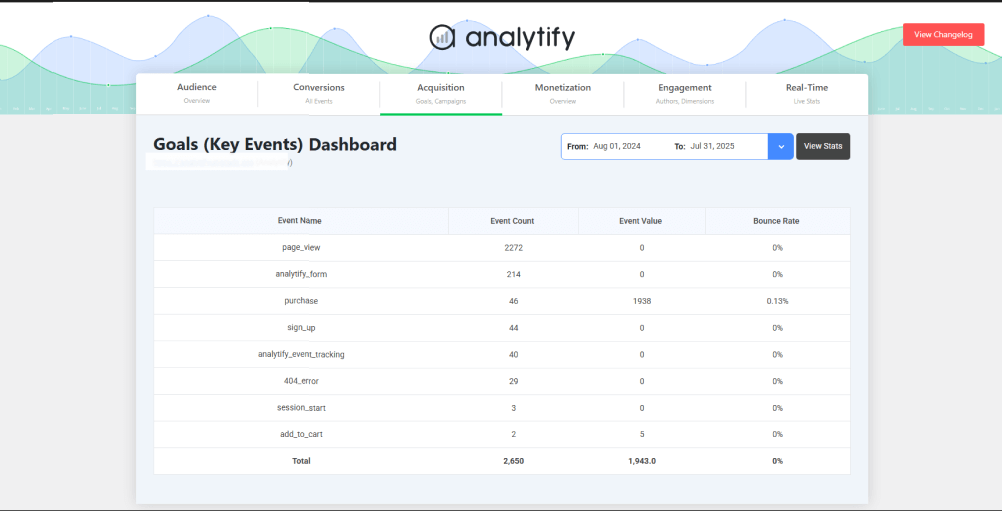
What makes Analytify special is how it translates complex GA4 metrics into human-friendly insights. Instead of managing multiple tools, you can see your newsletter’s performance, engagement, and ROI in one place.
Newsletter Design & Copywriting Tips for Higher Engagement
Four practices improve newsletter engagement: a strong subject line, clear CTA buttons, one main goal per email, and social and unsubscribe links in the footer.
1. Start with a Compelling Subject Line
Your subject line determines whether your email gets opened or ignored. Keep it short (under 50 characters), clear, and curiosity-driven. Personalization helps, too: studies show that Readers are 26% more likely to open emails with personalized subject lines.
2. Use Clear CTA Buttons
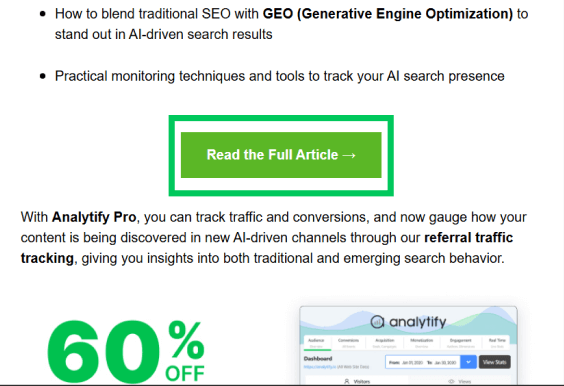
Every email should guide readers toward a single action, whether it’s reading your latest blog post or checking out a new product. Use bold, easy-to-spot call-to-action (CTA) buttons. Check out the CTA on Analytify’s newsletters:
3. Focus on One Main Goal per Email
Avoid clutter and mixed messages. Each newsletter should focus on one clear purpose, such as educating, promoting, or updating. Too many CTAs or competing ideas can confuse readers and reduce conversions.
4. Add Social Links and Unsubscribe Options
Encourage subscribers to follow you on other platforms by adding social icons in your footer. And never skip the unsubscribe link. It is both legally required and builds trust with your audience.
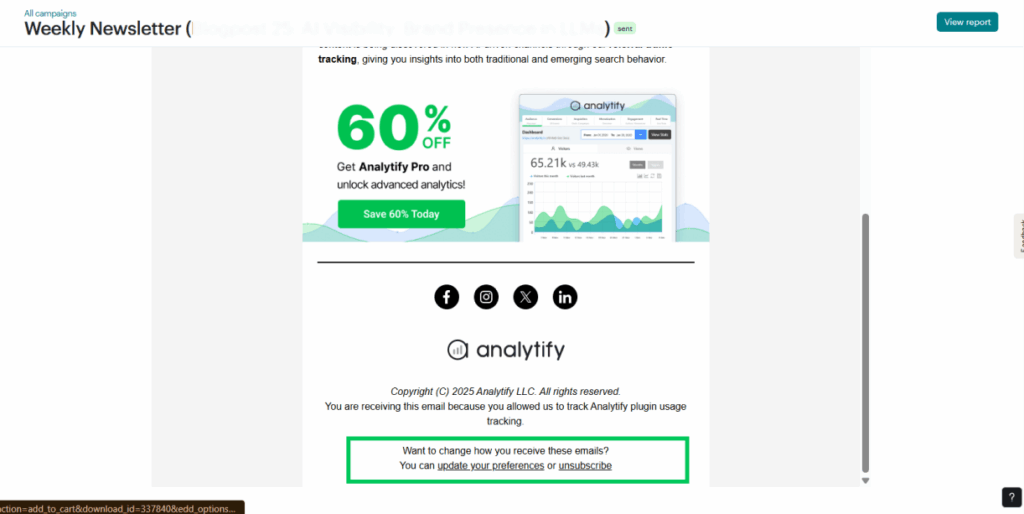
Clean design, clear writing, and a single focus are what make your email stand out in a crowded inbox and can help to turn casual readers into loyal fans.
If you are interested in learning more about marketing tips, consider looking into this quick, detailed blog on 21+ Email Marketing Best Practices 2025.
Common Mistakes to Avoid When Creating Newsletters
Four common mistakes can derail a newsletter: buying email lists, overdesigning, ignoring mobile, and not tracking performance. Each one is covered below with a fix.
1. Buying Email Lists
Do not buy email lists. Buying a list can violate privacy laws like GDPR and CAN-SPAM, and it damages your email deliverability.
Most of those contacts on that bought email list haven’t consented to hear from you, meaning your emails are likely to end up in spam folders anyway. What works best is continually growing your list organically through sign-up forms or lead magnets.
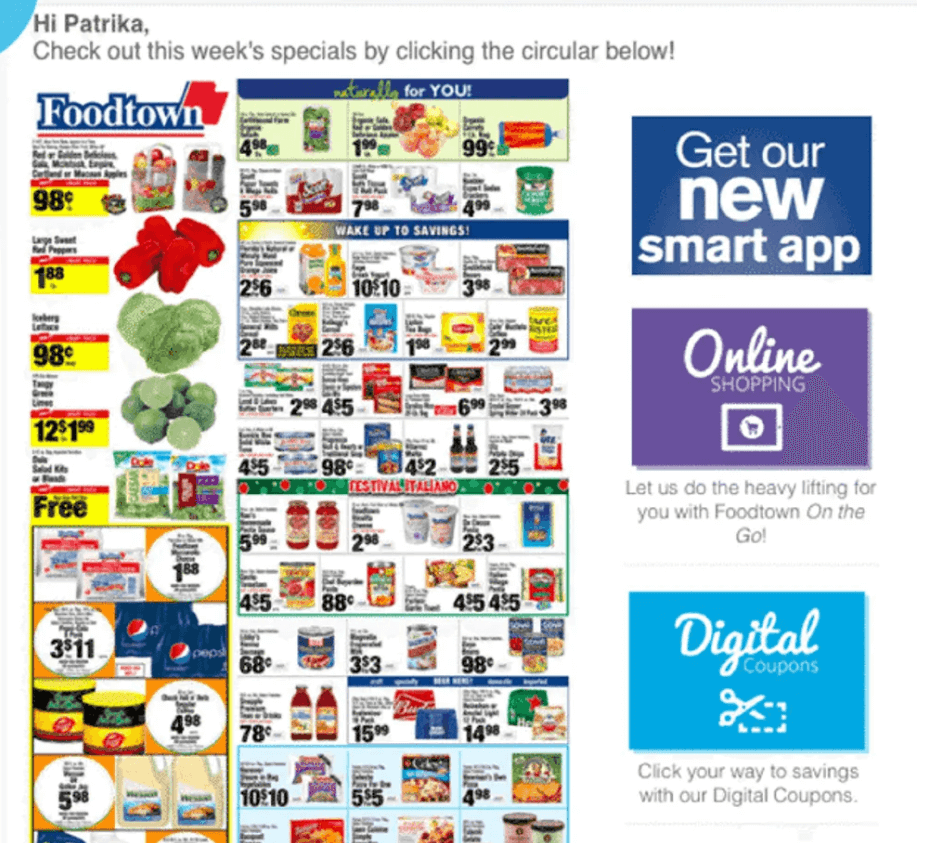
2. Overdesigning or Using Too Many CTAs
A flashy email full of buttons and banners might look exciting, but it often confuses readers. Stick to one clear call to action (CTA) per email and a simple, mobile-friendly layout that keeps the focus on your message. An example is:
3. Ignoring Mobile Optimization
A whopping 81% prefer to open emails on their smartphones, so if your layout isn’t responsive, you’re losing readers instantly. Test every campaign on both desktop and mobile before you learn how to make email newsletter.
4. Not Tracking Performance Data
Sending emails blindly without tracking opens, clicks, and conversions is damaging. Use analytics plugins like Analytify in WordPress to monitor results and refine your strategy based on what actually works.
Avoiding these pitfalls can help grow and monetize your WordPress newsletter; they won’t only look better but also perform efficiently.
Check out Top 20 Marketing Hacks for Website Traffic Growth (2025) for quick hacks for your website optimization.
FAQs on How to Create an Email Newsletter
How do you create an email newsletter for free?
You can start for free using tools like Mailchimp or MailPoet, which offer beginner-friendly plans. Sign up, connect your WordPress site, and start designing your first campaign using their drag-and-drop editors.
Can I make a newsletter directly from WordPress?
Yes! With plugins like MailPoet or Newsletter, you can design, send, and manage newsletters right from your WordPress dashboard, with no external tool needed.
How often should I send newsletters?
The best practice is usually once a week or every two weeks. Consistency matters more than frequency. Send often enough to stay top-of-mind, but not so much that you overwhelm subscribers.
What should be included in an email newsletter?
Focus on valuable content such as blog updates, offers, tutorials, or product news. Also, always include a clear call to action (CTA), engaging visuals, and links to your website or social profiles.
How to Create an Email Newsletter: Conclusion
In 2026, learning how to create an email newsletter will remain one of the most effective ways to build audience trust and drive conversions. The website newsletter gives you direct access to readers, without algorithms or middlemen.
Start small: send your first campaign, test what works, and refine your strategy using insights from Analytify. Progress and consistent tracking matter more than perfection, and every send teaches you more about your audience. For related guides, see:
- How to Track Email Marketing with Google Analytics (2026)
- 13 Keys to Creating a Perfect Marketing KPI Dashboard
- 5 Best Email Template Builders & Tools for 2026
- How to Build a Website Analytics Dashboard for Your Business
So, are you ready to hit Send and learn how to create an email newsletter for deeper connections with your subscribers today? Let us know in the comments below your most valuable tips and tricks for learning how to create email newsletters!
 Halloween Sale: Know which campaigns drive sales this season.